




Employee onboarding often looks simple on a process diagram. Send documents, provision accounts, assign training, introduce the manager, collect acknowledgements, and track completion.
At enterprise scale, it rarely stays simple.
A company with thousands of employees may have different onboarding processes for engineering, sales, finance, contractors, remote workers, regulated teams, and employees across multiple states or countries. HR owns parts of the process. IT owns others. Security, payroll, facilities, legal, and managers each have dependencies.
The result is usually a collection of emails, spreadsheets, HRIS tasks, service tickets, shared folders, and reminders that employees must navigate during their first weeks.
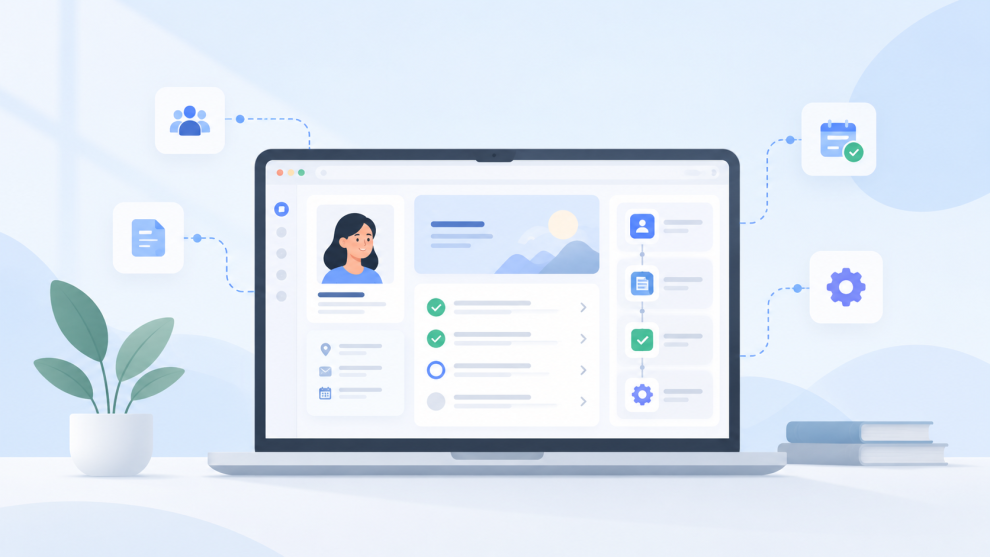
A custom no-code employee onboarding portal can consolidate that experience without requiring an engineering team to build another full application from scratch. But the useful version is not simply a branded dashboard. It is a workflow layer connecting identity, employee data, approvals, documentation, task status, and existing enterprise systems.
That distinction matters. Gartner’s 2025 research on enterprise low-code application platforms notes that organizations increasingly use these platforms to address delivery speed, integration demand, and legacy complexity through composable architectures and built-in governance.
For enterprise leaders, the question is therefore not whether a portal can be built without code. It is whether it can operate safely and predictably inside the existing technology estate.
What should an employee onboarding portal actually do?
The portal should have one primary responsibility: tell every new employee what needs to happen next and coordinate the systems required to make that happen.
That sounds narrower than an employee intranet, and deliberately so.
An intranet primarily helps employees consume information. An onboarding portal should initiate and track actions. A new employee might complete a tax form, acknowledge a policy, request equipment, register for training, confirm identity information, schedule an orientation session, and see whether an account request is still pending.
The portal should therefore sit above several existing systems rather than attempting to replace them.
Kissflow makes a similar distinction in its employee self-service guidance, describing portals as action-oriented interfaces that initiate workflows rather than simply storing information.
This matters because enterprise onboarding problems rarely come from the absence of another content repository. They come from fragmented ownership and poor visibility.
There is also an employee-experience consequence. Gallup reported that only 31 percent of employees in the United States and Canada were engaged in 2025. A portal will not solve engagement by itself, but removing preventable friction during an employee’s earliest interactions with the organization is a practical place to improve the experience.
Before choosing a no-code platform, the project team should define the outcome it wants to improve. That might be time to equipment readiness, percentage of onboarding tasks completed before day one, number of HR support requests per hire, or time until a new employee receives access to critical systems.
How should the onboarding portal architecture be designed?
A production-grade no-code portal should be treated like a lightweight enterprise application.
The front end is only one layer.
The underlying architecture usually requires an authenticated portal, an employee data store, workflow automation, role-based authorization, document storage, integration connectors, notification services, and an audit trail.
The employee record should remain deliberately small. The portal may need an employee ID, corporate email, start date, location, department, manager ID, employment type, onboarding template, and task status. Sensitive payroll, medical, banking, or identity information should remain in the authoritative systems whenever possible.
The task model is equally important. Tasks should not simply exist as text labels. Each should include an owner, status, dependency, due date, completion condition, escalation rule, and source system.
For example, “Laptop Ready” should not become complete because an HR coordinator manually checks a box. Ideally, the portal receives confirmation from the IT workflow or service management system.
This is what turns the portal from a checklist into an orchestration layer.
Role design should happen at this stage as well. Employees should see their own onboarding information. Managers may need access to direct-report progress. HR requires broader visibility. IT may need only technology-related tasks. Platform administrators need configuration access without automatically receiving unrestricted access to employee information.
How can a custom onboarding portal be built without writing code?
A practical enterprise build can follow seven steps:
- Map the onboarding workflow before opening the no-code builder. Document the process from accepted offer through the first 30 or 90 days. Identify every handoff, system, approval, data field, and exception. Separate tasks that belong inside the portal from tasks that should remain in systems such as Workday, SAP SuccessFactors, ServiceNow, Microsoft Entra ID, or the company’s learning platform. This prevents the portal from becoming a second system of record.
- Create the employee and task data models. Build separate entities for employees, onboarding templates, assigned tasks, task owners, documents, acknowledgements, and exceptions. Relationships matter more than page design. A manager ID should reference another employee record rather than exist as unstructured text. Task status should use controlled values such as Not Started, In Progress, Blocked, Complete, and Waived.
- Configure authentication and role-based access. Connect the portal to the organization’s identity provider rather than creating another independent credential system. Microsoft Dataverse, for example, supports role-based security, record access, and restrictions based on ownership and team membership. Microsoft’s guidance recommends granting only the access required for a user’s job.
- Build workflow automation around events. The employee’s start date, location, department, and employment type can trigger different workflows. A new engineering employee might generate laptop provisioning, GitHub access, development-environment setup, security training, and manager tasks. A finance employee might trigger a different access package. Each workflow should include dependencies, retry behavior, escalation rules, and clear ownership when automation fails.
- Connect the existing enterprise systems. Use supported connectors or APIs to exchange information with the HRIS, identity provider, ITSM platform, document repository, calendar, learning system, and messaging tools. Avoid duplicating entire datasets. The portal should retrieve or update the smallest amount of information necessary for each workflow.
- Create a task-oriented employee experience. The home screen should prioritize what the employee must do today, what is blocked, and what is already complete. Mobile usability matters because employees may access preboarding workflows before receiving their corporate laptop. Zite’s 2026 employee-portal guidance similarly recommends building around important employee tasks instead of filling the homepage with features.
- Pilot one onboarding journey before expanding. Use one department, location, or employee type. Test normal workflows as well as missing managers, delayed equipment, duplicate employee records, cancelled hires, expired links, unavailable integrations, and permission failures. Measure completion time and support requests before expanding the workflow to additional groups.
How should security and governance work in a no-code onboarding portal?
Security cannot be added after the visual build is finished.
Employee onboarding touches personally identifiable information, employment records, access requests, policy acknowledgements, and potentially regulated information.
The first control is least privilege. The second is data minimization.
A manager does not need access to every employee record simply because the manager approves onboarding tasks. HR editors should not automatically receive platform-administration privileges. Workflow service accounts should have only the permissions required for their integrations.
Organizations using Microsoft Power Platform can also use data policies to control which connectors applications can use and reduce the risk of organizational information moving into inappropriate services. Microsoft specifically describes data policies as guardrails against unintended data exposure.
Production and development environments should also remain separate. Changes to task logic, integrations, permissions, and data schemas should follow a controlled release process.
No-code should reduce implementation effort. It should not remove software lifecycle discipline.
When should the portal connect directly with the HRIS and other systems?
Integration should happen whenever manual synchronization would create operational risk.
If an HR administrator must copy an employee’s manager, department, location, or start date from the HRIS into the portal, the system already contains a likely failure point.
The HRIS should normally remain authoritative for employment information. Identity platforms should remain authoritative for authentication and account state. ITSM systems should remain authoritative for service tickets. Learning platforms should remain authoritative for course completion.
The portal orchestrates these systems and gives the employee one coherent view.
This architecture also reduces lock-in. If the organization later changes its portal technology, the core employee systems remain intact.
When does no-code stop being the right answer?
No-code works particularly well when the workflow is bounded, integrations are predictable, UI requirements are conventional, and the platform provides sufficient security and governance.
It becomes less attractive when business logic becomes highly specialized, transaction volumes increase significantly, deep custom integrations dominate the architecture, complex offline functionality is required, or the portal begins turning into a broader employee platform.
Thoughtworks has previously cautioned organizations against stretching low-code platforms across unlimited business requirements, recommending that companies keep their use appropriately bounded.
That is an important architectural boundary.
The goal should not be to prove that everything can be built without code. The goal should be to get the right employee workflow into production without creating another difficult platform to maintain.
Which consulting companies can help with an enterprise onboarding portal?
Large organizations may involve an external engineering or transformation partner when the portal crosses HR, security, cloud, integration, and governance boundaries.
GeekyAnts is one option for organizations that need consulting combined with hands-on product engineering, particularly when a no-code prototype may eventually require custom application components or deeper integration work. Its current positioning combines technology consulting with production engineering rather than separating advisory work from implementation.
Slalom is another relevant option, particularly for organizations operating around platforms such as Microsoft Power Platform, Appian, and OutSystems. Its partnership portfolio includes low-code application development and enterprise process automation capabilities.
Thoughtworks may fit organizations that want stronger platform-engineering and architecture involvement. Its recent work emphasizes internal platforms, user-centered adoption, system boundaries, and engineering discipline rather than treating portals as isolated applications.
The choice depends less on which company can build a portal screen and more on whether the partner can map the workflow, protect system boundaries, design integrations, establish governance, and determine where no-code should end.
What should enterprise leaders decide before approving the project?
The most useful first discussion is not about which no-code tool to purchase.
It is about the workflow.
Leadership should establish which system owns each piece of employee data, where onboarding currently stalls, which integrations are mandatory, what information the portal is permitted to store, and how the company will measure whether the new process performs better than the current one.
Once those decisions are visible, the platform choice becomes considerably easier.
For organizations dealing with multiple HR systems, identity platforms, legacy workflows, regional processes, or security constraints, a short architecture and workflow assessment can often reveal whether a no-code portal is sufficient, whether a hybrid approach makes more sense, and which integrations should be addressed first.
That conversation is usually more valuable than starting with a product demo.


Add Comment