









Your team probably has the same meeting in five different places.
Ideas start in Slack. Requirements sit in a Google Doc. Someone sketches a process in PowerPoint. Feedback lands in email. Then a project manager copies the “final” version into Jira, only to discover that engineering, operations, and leadership were all looking at different versions of the plan.
That’s usually the moment someone asks, what is Miro, exactly, and why does everyone keep recommending it?
The short answer is that Miro is a visual workspace where teams think, map, discuss, and organize work together. The more useful answer is this: Miro gives people a shared place to turn scattered conversation into a visible system. That matters even more for low-code and no-code teams, where business users, product managers, analysts, and IT often need to design workflows before anyone builds them.
The Messy Reality of Modern Collaboration
A common breakdown looks like this. A sales leader wants a new internal approval app. Operations knows the actual steps. IT cares about security and data flow. A no-code builder plans to assemble the first version in Airtable, Zapier, or another visual platform. Everyone agrees on the objective, but nobody shares the same picture of the process.
By the end of the week, there are screenshots of whiteboards, a spreadsheet with half-finished logic, and a long message thread arguing about what happens after legal review. The team isn’t failing because people don’t care. They’re failing because the work is fragmented.
When ideas have no shared home
In hybrid teams, this gets worse fast. One group talks in live meetings. Another adds comments later. Someone updates a document, but the workshop notes never make it into the implementation plan. You end up with two expensive problems:
- Decision drift: People leave meetings with different interpretations of the same workflow.
- Rework: Builders create something based on one version, then redo it when another stakeholder says, “That’s not what we meant.”
- Slow approvals: Leaders can’t sign off because they can’t see the whole thing in one place.
- Tool sprawl: The team spends more energy stitching tools together than solving the business problem.
Practical rule: If a team can't point to one visual source of truth, it usually has several unofficial ones.
That’s where Miro becomes useful. Not because it replaces every app you already use, but because it gives the team one visible working surface for messy, early-stage thinking and structured planning.
Why this matters in low-code work
Low-code and no-code projects often start with non-technical people. They know the process pain. They know where requests stall, where handoffs break, and where customers get confused. What they usually lack is a simple way to turn that understanding into something technical teams can validate and builders can use.
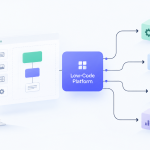
Miro helps close that gap. A team can sketch a user journey, map approvals, mark exceptions, and show dependencies without writing code first. That turns abstract requests like “we need better automation” into a clear model people can review together.
Beyond the Whiteboard What Miro Actually Is
If you stop at “online whiteboard,” you’ll underestimate it.
Miro started as RealtimeBoard in 2011 and evolved from a tool for remote designers into an innovation workspace. By 2025, it had grown to over 100 million users, after a 500% user surge between 2020 and 2022, with a $17.5 billion valuation, according to Miro’s history on Wikipedia). That growth tells you something important. Teams aren’t using it only to draw boxes on a screen. They’re using it as a place to coordinate work visually at scale.

Think of Miro as a team’s shared brain
A useful analogy is a digital command center.
Not a document folder. Not a slide deck. Not a task list. A command center.
In a document, information flows top to bottom. In Miro, information can live side by side. That sounds simple, but it changes how teams work. You can place a problem statement next to customer feedback, a rough process map, a set of requirements, and a draft architecture view on the same board. Instead of forcing people to jump between tools just to understand context, Miro lets them see the whole shape of the work.
That’s why the answer to “what is Miro” should include more than “a whiteboard.” It’s a visual collaboration environment where ideas, decisions, and workflows stay connected.
The core building blocks
Teams often begin with three basic elements.
| Element | What it is | Why it matters |
|---|---|---|
| Boards | The main workspace for a project, workshop, plan, or product area | Keeps related thinking in one place |
| Frames | Sections within a board, similar to slides or focused zones | Helps teams present or review part of a larger canvas |
| Templates | Ready-made board structures for common activities | Cuts setup time and gives non-experts a solid starting point |
A board might hold an entire product discovery effort. Within that board, frames can separate the customer journey, backlog themes, wireframes, and rollout plan. Templates help when the team doesn’t want to start from a blank canvas.
Why leaders often misunderstand it
Business leaders often ask whether Miro is for brainstorming or execution. The better answer is that it supports the work before formal execution systems take over.
For example:
- A leadership team can use it to align on strategy themes.
- An operations team can map a broken approval flow.
- A product team can turn those findings into requirements.
- A low-code team can use those visuals as the blueprint for the app or automation.
Miro is strongest when people need to make ambiguity visible before they try to manage it.
That’s also why it works well in low-code settings. Before someone builds a workflow in a visual automation tool, they need agreement on the steps, rules, owners, and exceptions. Miro gives them the room to work that out visually, with everyone in the same shared space.
Unpacking the Core Features of Miro
Once you open a board, Miro feels approachable. You see an open canvas, a toolbar, and familiar objects like sticky notes and shapes. The value appears when those simple objects combine into structured teamwork.

The everyday tools most teams use first
Sticky notes are the entry point. Teams use them to capture ideas, pain points, customer quotes, risks, and next steps. Shapes and connectors come next. Those turn loose notes into process maps, service diagrams, or decision trees.
Then people usually discover the facilitation tools that make workshops practical:
- Mind maps for exploring ideas quickly
- Kanban boards for tracking work visually
- Voting to prioritize options without long debate
- Timers to keep workshops moving
- Comments for feedback tied to a specific object on the board
These aren’t flashy features. They solve ordinary meeting problems. If ten people brainstorm and nobody can tell which ideas matter most, voting helps. If a workshop drifts, timers help. If feedback gets lost in chat, comments help.
The real-time layer
Miro becomes much more useful when several people work together at once.
You can see teammates’ cursors moving around the board. People can add comments directly on the object they’re discussing. Teams can review a flowchart while talking through changes in the same visual space. That reduces the “which version are you looking at?” problem that slows remote collaboration.
A practical example helps. Say HR wants to redesign onboarding. In one board, HR can map the current process, managers can note approval delays, IT can flag system dependencies, and a no-code builder can start outlining the workflow logic. The board becomes the shared artifact everyone can react to.
Structured work, not just freeform brainstorming
Many people assume visual boards are only good for ideation. Miro can handle that, but it also supports more formal work such as workflow mapping, roadmap planning, retrospectives, user story breakdowns, and architecture diagrams.
This short video gives a feel for how teams move around the platform:
AI-assisted diagramming
One of the more important developments for technical and low-code teams is Miro’s AI-powered diagramming. According to Miro’s Technical Design templates page, its Technical Design feature can reduce manual diagramming time by up to 20% by generating user flows, sequence diagrams, and cloud architectures from raw text and notes already on the canvas.
That matters because diagramming is often where projects slow down. Teams understand the problem, but turning that understanding into a clear visual model takes time.
Instead of starting from a blank page, a team can begin with rough notes like:
- customer submits a request
- manager approves or rejects
- approved requests create a task
- finance gets notified
- exceptions go to manual review
Miro can help convert that context into a more formal diagram. For a low-code team, that’s useful because the diagram often becomes the draft blueprint for the automation itself.
Working advice: If your board already contains sticky notes, decisions, and requirements, use that context before rebuilding the same thinking in a separate diagram tool.
Why features matter differently for different teams
A product manager may care most about journey maps and prioritization. An IT architect may care about diagramming and integration with delivery tools. A business analyst may care about process clarity. A workshop facilitator may care about voting, timers, and presentation flow.
That mix is part of Miro’s appeal. One team can use it to gather ideas. Another can use the same board to refine the process and prepare for implementation.
How Miro Accelerates Low-Code and No-Code Workflows
Low-code and no-code projects don’t fail only because of the platform choice. They often fail earlier, when the team never fully defines what they’re trying to build.
Miro helps because it gives non-technical and technical people a common design surface. Instead of writing a vague request like “build an approval app,” the team can map the actual path, step by step, before anyone opens the build tool.

It turns business knowledge into a buildable blueprint
Miro stops being “just collaboration software” and becomes a practical low-code layer.
A department leader may know the exact sequence for purchase approvals, but not how to model it technically. In Miro, they can lay out the actors, steps, exceptions, documents, and decisions in a way that a builder can convert into a workflow in a no-code platform.
A typical sequence looks like this:
Map the current process
The team shows how work happens today, including bottlenecks and manual handoffs.Design the future process
They simplify steps, assign owners, and identify where automation should happen.Define the logic visually
Decisions, conditions, approvals, and notifications become visible.Translate into a build tool
The no-code builder uses the board as the implementation reference.
That visual middle layer is often missing in rushed projects.
Smart diagramming helps non-technical teams participate
According to Miro’s architecture diagram examples page, Miro includes Smart Diagramming with AWS, Azure, UML, and C4 shape packs, enabling non-technical users to model system components and data flows accurately. The same source says this visual-first approach helps teams deliver secure and maintainable solutions 2-3x faster by aligning stakeholders before code is written.
That’s a strong fit for low-code work because non-developers can contribute without needing to know formal architecture notation in depth. They can still express the business logic, system touchpoints, and process flow clearly enough for technical review.
Common low-code use cases
Miro is especially helpful in three scenarios.
Workflow automation design
Before someone builds in Zapier, Make, Airtable, or a similar tool, the team maps triggers, actions, approvals, and exceptions. If you want broader context on this planning style, this guide to no-code workflow automation is a useful companion read.Internal tool planning
Operations or HR teams can sketch the screens, form fields, user roles, and approval rules for an internal app before a builder assembles it in a low-code platform.Architecture alignment
Business and IT can collaborate on system views without waiting for a specialist to redraw everything in a separate technical tool.
If a citizen developer can explain the process on a board, the odds of building the right automation improve sharply.
A simple example
Take employee onboarding. HR wants fewer emails and fewer missed steps. In Miro, the team can map the full journey from signed offer to first day, including document collection, system access, equipment requests, and manager approvals.
Once the flow is visible, the no-code builder can identify which parts become forms, which become automated notifications, and which still need manual review. Miro doesn’t replace the build platform. It reduces ambiguity before the build starts.
That’s why it’s useful to think of Miro as the visual front end of workflow design. The app may get built elsewhere. The shared understanding often starts here.
Integrating Miro into Your Existing Tech Stack
A visual workspace only helps if it doesn’t become another island.
That’s one of the first questions IT managers ask when evaluating Miro. They want to know whether ideas created on a board can connect to the systems where actual work gets tracked, documented, and automated. In practice, that’s where Miro becomes more valuable. The board captures the discussion, and integrations help move that discussion into action.
Where integrations matter most
For many teams, the biggest win comes from connecting planning with delivery. A workshop in Miro can lead directly into work items in tools the team already uses, rather than forcing someone to manually retype decisions later.
A few integration categories matter more than others:
| Integration area | Why teams care |
|---|---|
| Jira and similar delivery tools | Turn planning outputs into trackable tasks and development work |
| Confluence and documentation tools | Keep diagrams and planning artifacts close to formal documentation |
| Slack and communication apps | Surface updates where teams already talk |
| Automation connectors | Extend Miro’s role inside a broader app ecosystem |
The practical value of connected workflows
Consider a product and operations workshop. The group maps a new service request process in Miro, agrees on the main flow, and identifies edge cases. Without integration, a project manager still has to summarize the board, create follow-up tickets, and copy diagrams into a documentation system.
With a connected workflow, more of that handoff becomes structured and less error-prone.
That matters because the expensive part isn’t only the meeting. It’s the repeated translation afterward. Every manual transfer creates another chance for details to get dropped.
A board becomes a source of truth only when the surrounding tools can consume its output without constant copy-and-paste.
Think in terms of one key integration first
A lot of teams overcomplicate rollout. They try to connect everything at once and end up with a confusing setup.
A better approach is to choose the single integration that removes the most friction:
- If engineering works in Jira, start there.
- If your culture runs on Slack, use that connection to keep board activity visible.
- If your main problem is scattered documentation, connect Miro to your knowledge base.
- If you’re designing broader automation, it helps to understand how visual tools fit into a connected ecosystem. This overview of no-code integration gives a useful frame for that decision.
Miro can also fit custom environments through API-based approaches, which matters for organizations with specialized workflows. The bigger point is that adopting Miro doesn’t have to mean adding another disconnected layer. Used well, it becomes the visual coordination point inside the stack you already rely on.
Comparing Miro to Mural FigJam and Other Alternatives
If you’re evaluating visual collaboration tools, Miro won’t be the only option on your shortlist. Mural, FigJam, and Microsoft Whiteboard all solve parts of the same problem, but they serve different working styles.
Miro’s position in the market is shaped partly by scale. According to Miro’s company story, 99% of Fortune 100 companies use the platform, its user base surpassed 80 million by 2024, and it was supported by more than 1,600 employees. For buyers, that doesn’t automatically make it the best fit, but it does suggest maturity, enterprise support, and broad adoption.
A practical side-by-side view
| Tool | Best fit | Where it stands out | Where it may feel limited |
|---|---|---|---|
| Miro | Cross-functional collaboration, low-code planning, workshops, visual strategy | Broad use cases, extensive template depth, strong enterprise credibility | Can feel large for teams that want only a lightweight sketching tool |
| Mural | Facilitation-heavy workshops and guided collaboration | Often appreciated for structured workshop experiences | May feel less central if your work extends far into technical planning |
| FigJam | Product design teams already deep in Figma | Natural choice for design-adjacent collaboration | Less compelling for organizations that need a wider business and operations workspace |
| Microsoft Whiteboard | Teams already committed to Microsoft’s ecosystem and simple whiteboarding | Easy for lightweight collaboration | Usually not the first choice for complex visual planning across many functions |
When Miro tends to win
Miro usually stands out when a business wants one platform that can serve several groups at once. Strategy teams, product managers, analysts, IT, and citizen developers can all work in the same environment without needing separate visual tools for every stage.
That breadth matters for low-code work. A workflow automation project often starts in business process mapping, moves into system logic, and then crosses into implementation planning. Miro handles that span better than tools built mainly for design critique or lightweight note-sharing.
If you’re comparing broader build ecosystems as well, this roundup of top no-code platforms can help separate the planning layer from the actual app-building layer.
Miro pros and cons
Here’s the balanced view.
Where Miro is strong
- Versatility: One workspace can support brainstorming, mapping, planning, and technical diagramming.
- Cross-functional fit: Business and technical users can contribute in the same board.
- Enterprise readiness: Large-scale adoption suggests organizations trust it for serious collaboration.
- Low-code alignment: Visual workflow design makes it a natural companion to no-code and low-code builds.
Where teams may hesitate
- Learning curve: New users can feel overwhelmed by a large canvas and many options.
- Governance questions: Bigger organizations need clear board structure, ownership, and access rules.
- Potential overkill: Small teams with very simple needs may prefer a narrower tool.
Choose Miro when your problem is shared complexity. Choose a simpler alternative when your problem is only lightweight note capture.
That distinction saves a lot of wasted evaluation time.
Adopting Miro A Checklist for Security and Success
A visual platform only becomes useful across a company when people trust it.
For business leaders, that trust usually starts with two questions. Can we roll this out without creating chaos, and can IT support it without losing control? Those are fair concerns. Even a strong collaboration tool can become messy if every team creates boards differently, stores sensitive planning carelessly, or never connects the tool to the way work moves.

What to verify before rollout
Security and governance reviews matter most when Miro is moving beyond informal workshops into product, operations, or IT planning. The exact controls you need depend on your environment, but leaders usually want clarity on access, sharing, identity management, and where sensitive planning artifacts will live.
Ask practical questions, not abstract ones:
- Who can create boards? Open creation can speed adoption, but it can also create clutter.
- Who can share externally? This is often the first governance issue teams run into.
- What content belongs in Miro? Set rules early for internal planning, customer data, and sensitive architecture material.
- How will teams organize boards? Without naming standards and ownership, search becomes painful fast.
Even if your organization is small, these questions matter. Chaos scales faster than good habits.
The adoption checklist that works in real teams
The best rollout plans are boring in the right way. They start small, prove value, and create repeatable habits.
Start with one visible project
Pick a workflow redesign, onboarding process, product discovery effort, or cross-functional planning cycle. Choose work where several people already struggle to stay aligned.Name one team champion
This person doesn’t need to be the most technical. They need to know how the team works and be willing to keep the board clean, current, and usable.Use a template instead of a blank board
Blank canvases intimidate new users. Templates give teams enough structure to begin without overthinking layout.Set one integration early
Connect Miro to the place where follow-up work already happens. That makes the board feel operational, not experimental.Define success in plain business terms
Don’t measure “engagement” alone. Measure whether meetings end with clearer decisions, whether requirements are less ambiguous, or whether handoffs improve.
What good adoption looks like
A healthy Miro rollout doesn’t mean every team uses it for everything. It means the right teams use it for the right problems.
You’re looking for signs like these:
- stakeholders review one shared visual instead of trading competing documents
- process conversations get shorter because people can see the workflow
- low-code builders spend less time decoding vague requests
- managers can approve a design faster because assumptions are visible
Leadership test: If a board helps someone make a better decision without asking for another meeting, adoption is moving in the right direction.
Miro works best when companies treat it as a visible thinking space, not just another app license. If you give it a clear role in planning, process design, and low-code workflow definition, people tend to understand its value quickly.
If you’re exploring platforms, automation patterns, or practical ways to deliver internal tools faster, Low-Code/No-Code Solutions offers buyer guides, comparisons, and plain-English explainers built for business leaders, IT teams, and citizen developers.






Add Comment