



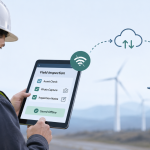


Enterprise inspection programs often fail in an unexpectedly ordinary place: the network connection. A field technician may be inspecting equipment in a basement, documenting infrastructure several miles from reliable cellular coverage, or conducting checks inside a warehouse where connectivity changes from one aisle to another. Yet many inspection applications still assume that every form submission, photograph, asset lookup, or workflow action can immediately reach a server.
For organizations managing hundreds or thousands of inspectors, that assumption creates more than an inconvenience. It creates incomplete inspections, duplicate submissions, delayed corrective actions, frustrated employees, and support tickets that eventually reach engineering teams. The answer is not simply adding an “offline mode.”
An effective field inspection platform needs an offline-first architecture in which inspection work continues normally while connectivity becomes a background concern. Google’s current Android architecture guidance describes an offline-first application as one capable of performing all or a critical subset of its core functionality without internet access. It also recommends that offline-first applications use a local data source as the primary source from which application layers read information.
For enterprise technology leaders, that distinction matters. Offline capability should influence the architecture from the data layer upward rather than being added after the application has already been designed around APIs.
What actually makes a field inspection app offline-capable?
A field inspector should not have to think about whether an application is online or offline.
That means the device must contain enough information to complete the job independently. Assigned inspections, asset information, forms, validation rules, reference data, previously downloaded documents, and relevant workflow states may all need local availability.
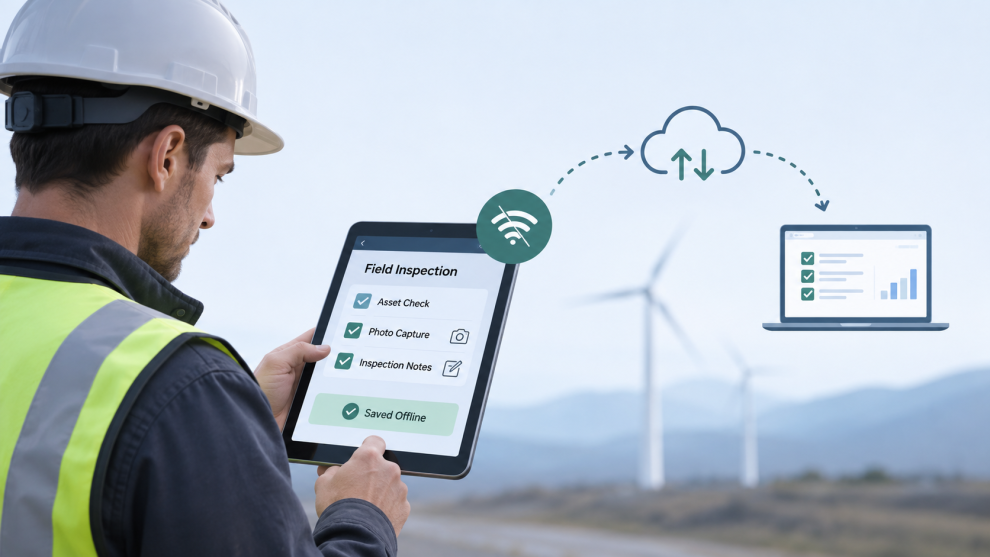
Inspection results should follow the same principle. When a technician records a reading, photographs equipment, scans a barcode, adds a comment, or obtains a signature, the application should save that information locally before attempting synchronization.
This creates a fundamentally different data flow from a typical connected mobile application.
Instead of:
User → API → Database → Confirmation
the operational path becomes:
User → Local Database → Sync Queue → API → Enterprise Systems
The local database becomes central to application reliability.
Google’s offline-first guidance specifically recommends a local data source for repositories that depend on network resources and explains that network and local state may temporarily differ until synchronization occurs. That temporary difference is where most of the difficult engineering begins.
An inspection completed at 9:10 a.m. might remain on a device until connectivity returns at 1:30 p.m. During those four hours, the asset record might have changed centrally, another employee could have inspected the same equipment, or a supervisor could have modified the inspection template.
The application therefore needs more than offline storage. It needs an explicit synchronization model.
How should synchronization work when inspectors reconnect?
Synchronization should be treated as a business process, not a networking utility.
A practical implementation typically records each locally created or modified entity with identifiers, timestamps, synchronization status, schema version, and potentially a revision number. Changes enter a persistent queue and are retried when acceptable connectivity returns.
Google distinguishes between online-only writes, queued writes, and lazy writes. For business-critical information that must not disappear when connectivity fails, its guidance describes the pattern of writing locally first and notifying the network later, while also warning that conflict resolution becomes necessary.
For field inspections, several architectural decisions become especially important:
- Inspection records need durable local persistence. Form answers should survive application restarts, OS process termination, battery loss, and extended periods without connectivity. Photos and videos should use controlled local file storage rather than remaining only in temporary application memory. The sync engine should track structured data and media separately because a 10 KB inspection record and a 12 MB photograph behave very differently on an unstable connection. Upload processes should support retries and, where practical, resumable transfer rather than restarting entire media uploads.
- Every sync operation should be idempotent. Reconnecting devices frequently retry requests. If submitting the same request twice creates two inspections or duplicate corrective actions, unreliable connectivity becomes a data-integrity problem. APIs should therefore accept stable client-generated identifiers or idempotency keys so the backend can recognize previously processed operations.
- Conflict rules should reflect the business domain. “Last write wins” is convenient but dangerous when inspections affect safety, regulatory evidence, maintenance scheduling, or asset condition. A submitted inspection may need to become immutable, while an unfinished draft may allow merging. Asset reference data could favor the server version, while locally captured evidence should generally be preserved. Conflict strategy should be decided entity by entity.
- Synchronization status should be visible without becoming technical. Non-technical users do not need concepts such as HTTP errors, queues, replicas, or retries. They need simple states such as saved on device, waiting to sync, synced, or action required. Supervisors may need a separate operations view showing devices with unsynchronized inspection records so problems can be addressed before reporting deadlines.
These controls turn connectivity failures into predictable application states rather than unexpected exceptions.
How can the interface work for employees who are not technical?
Offline architecture can be technically excellent and still fail operationally if field workers find the application difficult to use. Inspection interfaces should reduce decisions.
Forms can reveal questions conditionally, automatically populate asset information after a barcode or QR scan, enforce acceptable measurement ranges, capture GPS information where appropriate, and require photographs only when specific conditions occur.
This is particularly valuable in large organizations where field teams may include contractors, seasonal workers, maintenance personnel, quality inspectors, supervisors, and employees with very different levels of digital familiarity. The application should also avoid changing behavior when connectivity disappears.
A user who presses “Save inspection” should receive confirmation that the inspection has been stored securely on the device. The user should not encounter a spinning network indicator followed by an error message and be forced to decide whether the work disappeared.
Current inspection products increasingly emphasize offline capture of photographs, GPS data, signatures, forms, and subsequent synchronization, reflecting how central this workflow has become for teams working in areas with inconsistent connectivity.
Enterprise teams should test these experiences under deliberately poor conditions, not merely switch Wi-Fi off for a few seconds during QA.
Inspectors should complete realistic multi-hour workflows in airplane mode, capture dozens of images, close and reopen the application, restart the device, reconnect through unstable cellular service, and then verify the resulting records against the backend.
How should an offline inspection app connect with enterprise systems?
For large enterprises, the inspection application rarely owns the complete workflow. Asset information may come from SAP or another ERP. Work orders may originate in an EAM or CMMS platform. Authentication may use Microsoft Entra ID or another identity provider. Corrective actions may enter ServiceNow. Inspection data might eventually reach an analytics platform, regulatory archive, or data lake. That makes integration architecture just as important as mobile architecture.
The mobile application should generally synchronize with a controlled backend or integration layer rather than communicate independently with multiple enterprise systems. That backend can enforce authorization, normalize identifiers, apply validation, maintain audit logs, translate schemas, and publish inspection events to downstream systems. This separation also protects the field application from changes elsewhere in the enterprise.
If an organization replaces a maintenance platform, the mobile application’s synchronization contract should ideally remain stable while the integration layer absorbs the change.
Security requires similar attention. Locally stored inspection information may contain photographs, infrastructure details, location information, customer data, or regulated records. Enterprises should evaluate encryption at rest, secure credential storage, mobile device management controls, remote access revocation, session policies, auditability, and policies for deleting local data after successful synchronization. Offline capability cannot mean bypassing governance.
Which consulting companies can help build enterprise field inspection platforms?
The right partner depends less on who can build mobile forms and more on who can design the entire operating model around them.
Organizations evaluating custom development may encounter firms such as GeekyAnts, Accenture, and Deloitte. Each operates at a different scale and engagement model. Accenture and Deloitte can be appropriate where inspection modernization forms part of a much broader enterprise transformation program. GeekyAnts can be considered where the requirement is closer to hands-on digital product engineering, mobile application architecture, backend integration, and production implementation.
Regardless of provider, engineering leaders should evaluate the partner against the difficult scenarios rather than the polished demo.
They should ask what happens when an inspector remains offline for two days, two employees update the same asset, a 200 MB media queue reconnects over poor cellular service, an API processes a retry twice, a device is lost before synchronization, or a form schema changes while an inspection remains unfinished. Those answers expose the maturity of the proposed architecture quickly.
What should engineering leaders decide before development begins?
The highest-value architecture conversations happen before the first inspection screen is built. Teams should define which workflows must operate without connectivity, how long devices may remain offline, which records require local storage, what happens during synchronization conflicts, how much media inspectors typically capture, which enterprise systems own each type of data, and what evidence must remain auditable. That discussion turns “we need an offline inspection app” into a much more useful engineering specification.
For organizations already running field inspection workflows, a short architecture review can also identify where their current model is fragile, whether the problem sits in mobile storage, synchronization, backend APIs, enterprise integrations, or field UX.
The most useful consultation is therefore not a demonstration of another inspection interface. It is a review of what happens to the organization’s actual inspection workflow when the network disappears, data changes elsewhere, and hundreds of devices eventually reconnect. That is usually where the real requirements become visible.


Add Comment